
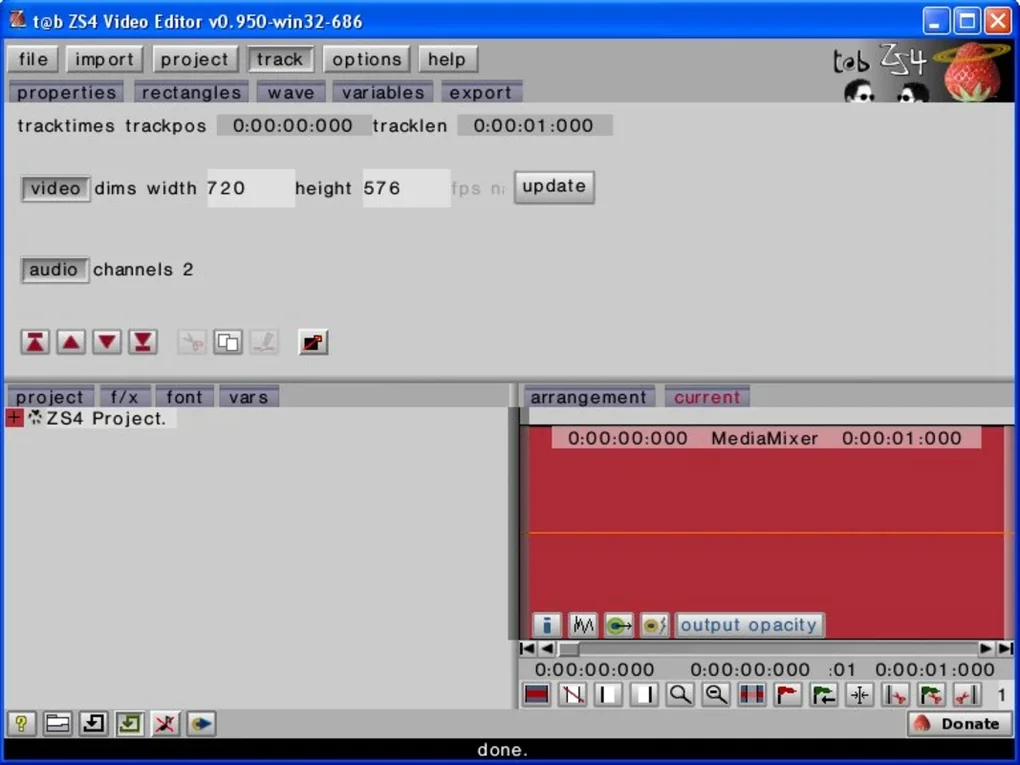

Download ZS4 Video Editor – Powerful Free Video Editing Software for Windows & macOS
Overview
ZS4 Video Editor is the modern successor to the well‑known Zwei‑Stein suite, delivering a comprehensive multimedia editing experience that rivals many paid alternatives. Built for both hobbyists and semi‑professional creators, ZS4 blends an extensive toolbox with support for an impressive array of audio‑visual formats, including AVI, WAV, MPG, BMP, and JPG, without imposing any file‑quantity limits. While the initial interface can feel dense to newcomers, a short learning curve unlocks a wealth of capabilities such as advanced color correction, precise image adjustments, distortion effects, video resizing, and speed control.
Whether you are stitching together a travel vlog, polishing a corporate presentation, or experimenting with creative visual effects, ZS4 provides the flexibility needed to craft polished, high‑quality videos. Its free‑to‑download model ensures that cost is never a barrier, and regular updates keep the tool secure, compatible with the latest operating system releases, and enriched with new filters and transitions. In short, ZS4 Video Editor stands out as a secure, feature‑rich, and completely free video editing solution that can comfortably sit alongside industry‑standard tools.
Key Features and Capabilities
- Multi‑Format Support: Native handling of AVI, MP4, MOV, WMV, MPG, WAV, MP3, BMP, JPG, PNG, and many more, allowing seamless import and export.
- Advanced Color Grading: Color wheels, curves, LUT import, and real‑time preview to achieve cinematic looks.
- Robust Audio Editing: Waveform view, noise reduction, equalizer, and synchronization tools for perfect sound.
- Distortion & Effects Suite: Lens distortion correction, fish‑eye, kaleidoscope, glitch, and motion blur effects.
- Speed & Time‑Lapse Controls: Variable speed ramps, reverse playback, and frame‑by‑frame extraction.
- Dynamic Resizing & Cropping: Aspect‑ratio conversion, custom canvas sizes, and intelligent content‑aware scaling.
- Layer‑Based Timeline: Unlimited video, audio, and image tracks with keyframe animation.
- Export Presets: Optimized settings for YouTube, Vimeo, Instagram, and local playback.
- Free Updates & Community Plugins: Regular security patches and a growing library of third‑party extensions.
Each feature is designed with an eye toward performance and usability. For instance, the color grading module leverages GPU acceleration when available, delivering smooth real‑time previews even on mid‑range hardware. The effects suite includes both preset filters and fully customizable parameters, letting you tailor each visual tweak to your exact vision.
Moreover, ZS4’s timeline supports non‑linear editing, meaning you can rearrange clips, add transitions, and overlay text without re‑rendering the entire project. This flexibility makes the software suitable for quick social‑media clips as well as longer, narrative‑driven productions. The integrated export presets also simplify the final step: select the desired platform, adjust a couple of bitrate settings, and let ZS4 handle the rest, ensuring optimal playback quality while keeping file sizes manageable.
Installation, Usage Instructions & Compatibility
Step‑by‑Step Installation
- Visit the official ZS4 website and click the Download for Windows or Download for macOS button.
- Run the installer file (
.exefor Windows,.dmgfor macOS). - Follow the on‑screen wizard: accept the license agreement, choose the installation folder, and optionally create a desktop shortcut.
- Allow the installer to download additional codec packs if prompted; this ensures maximum format compatibility.
- Click Finish and launch ZS4 Video Editor from the start menu or Applications folder.
First‑Run Configuration
Upon first launch, ZS4 presents a welcome screen that guides you through basic preferences: language selection, default project folder, GPU acceleration toggle, and automatic update checks. It is advisable to enable GPU acceleration if your system supports DirectX 12 (Windows) or Metal (macOS), as this dramatically speeds up rendering and preview.
Basic Workflow
1. Create a New Project: Choose a preset resolution (e.g., 1080p @ 30 fps) or define a custom canvas size.
2. Import Media: Drag‑and‑drop video clips, images, and audio files onto the media bin.
ZS4 will automatically generate thumbnails for quick identification.
3. Edit on the Timeline: Place clips on separate tracks, trim using the razor tool, and add transitions by dragging them from the effects panel.
4. Apply Effects: Select a clip, open the “Effects” tab, and choose from color grading, distortion, or speed‑control modules.
Adjust parameters in real time.
5. Export: Click the “Export” button, pick a preset (YouTube 1080p, Instagram Story, etc.), set the output folder, and start rendering.
Operating System Compatibility
ZS4 Video Editor runs natively on Windows 10/11 (64‑bit) and macOS 12 Monterey or later. The software also offers a limited web‑based version for Android and iOS devices, allowing basic trimming and filter application on the go, though the full desktop feature set remains exclusive to Windows and macOS.
Minimum system requirements include a dual‑core CPU (Intel i3/AMD Ryzen 3 or higher), 4 GB RAM (8 GB recommended), and at least 500 MB of free disk space for the program and temporary render files. For optimal performance with high‑resolution (4K) footage, a modern GPU with 2 GB VRAM is recommended.
Pros, Cons & Frequently Asked Questions
Pros
- Completely free with no hidden licensing fees.
- Extensive format support eliminates the need for external converters.
- Advanced color correction and effects suite rival paid competitors.
- GPU acceleration for faster rendering on compatible hardware.
- Regular security updates keep the application safe and stable.
Cons
- Initial interface can appear overwhelming for beginners.
- macOS version lags slightly behind Windows in terms of feature parity.
- No native cloud‑based collaboration tools.
- Limited built‑in stock media library compared with subscription services.
FAQ
Is ZS4 Video Editor truly free or are there hidden costs?
ZS4 Video Editor is completely free to download and use. There are no hidden subscription fees or pay‑walls. Optional third‑party plugins may have their own licensing, but the core application remains free.
Can I edit 4K video with ZS4?
Yes, ZS4 supports 4K (3840×2160) resolution editing. For smooth playback and faster renders, enable GPU acceleration and ensure your system meets the recommended hardware specs.
Does ZS4 offer any built‑in templates for social media?
While ZS4 does not include a large library of pre‑made templates, it provides export presets tailored for YouTube, Instagram, TikTok, and Vimeo, which automatically apply optimal resolution, bitrate, and aspect‑ratio settings.
How often does ZS4 receive updates?
The development team releases major updates approximately every 2–3 months, with minor security patches and bug fixes rolled out as needed. Users can enable automatic update checks in the preferences panel.
Can I use ZS4 on a laptop without a dedicated GPU?
Yes, ZS4 will run on integrated graphics, but rendering times will be longer, especially for high‑resolution projects. For best performance, a dedicated GPU is recommended.
Overall Verdict: ZS4 Video Editor delivers a surprisingly robust feature set for a free tool, making it an excellent choice for creators on a budget. Its primary drawback is the learning curve, but the extensive documentation and community forums help flatten that hill.
Conclusion – Should You Download ZS4 Video Editor?
If you are looking for a secure, free, and versatile video editing solution that can handle everything from simple cuts to advanced color grading, ZS4 Video Editor is a compelling option. Its support for a wide range of file formats, powerful effects suite, and regular updates make it a reliable choice for Windows and macOS users alike. While the interface may feel dense at first, investing a few minutes in the built‑in tutorials will unlock a professional‑grade toolkit without any cost. Whether you are a student, a small‑business marketer, or an aspiring YouTuber, ZS4 provides the tools you need to produce polished videos quickly and securely.
Ready to start editing? Download ZS4 Video Editor now and experience a free, feature‑rich editor that keeps pace with your creative ambitions.







